Skip to content
-
Subscribe to our newsletter & never miss our best posts. Subscribe Now!
Technical Personnal Blog

Technical Personnal Blog

Technical Personnal Blog

Technical Personnal Blog

  • Tech
  • Blog
  • Open Source
  • VEGAS
  • CARD
  • Favorite Link
  • Shop
  • Cart
  • Checkout
  • My account
  • Tech
  • Blog
  • Open Source
  • VEGAS
  • CARD
  • Favorite Link
  • Shop
  • Cart
  • Checkout
  • My account
Close

Search

  • https://www.facebook.com/
  • https://twitter.com/
  • https://t.me/
  • https://www.instagram.com/
  • https://youtube.com/
Subscribe
BlogTech

How to set java_home on Windows 10?

By techsupport
June 30, 2016 2 Min Read
Comments Off on How to set java_home on Windows 10?

[more…]

How to set java_home on Windows 10?

This tutorial shows you how to set a JAVA_HOME system variable on Windows 10.

Tested

  1. Windows 10
  2. JDK 1.8

1. Advanced System Settings

Type advanced system settings in the search box (beside the Windows start button), clicks View advanced system settings.
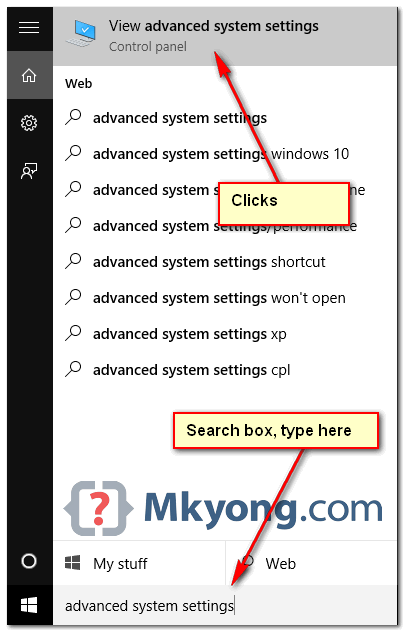
1_windows10_search_box

2. Environment Variables

Select Advance tab, clicks Environment Variables
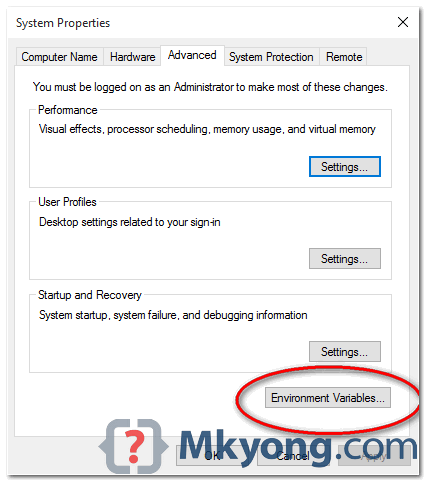
2_windows_environment_variable

3. Add JAVA_HOME

In System variables, add a new JAVA_HOME variable and point it to the JDK installed folder.
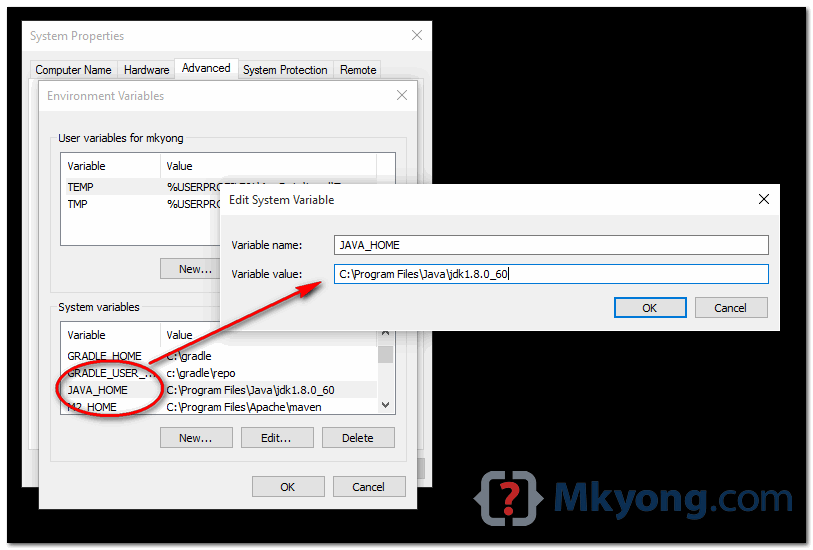
3_java_home_windows_10
Note
Don’t include the \bin folder, just the JDK path. For example

  1. Correct – C:\Program Files\Java\jdk1.8.0_60
  2. Wrong – C:\Program Files\Java\jdk1.8.0_60\bin

4. Update PATH

In System variables, find PATH, clicks edit and append this %JAVA_HOME%\bin to the end.
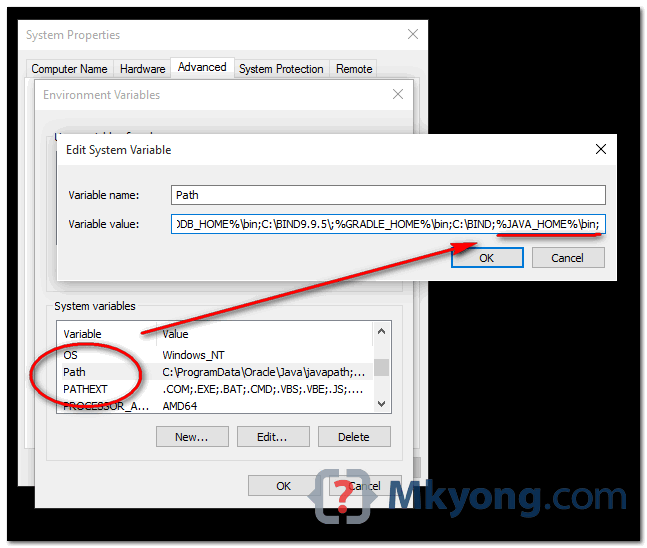
4_java_home_windows_10

P.S Puts the JAVA_HOME\bin in PATH make the Java’s commands are accessible from everywhere.

Done.

5. Test

Open a command prompt, type :

Bash
C:\Users\mkyong>java -version
java version "1.8.0_60"
Java(TM) SE Runtime Environment (build 1.8.0_60-b27)
Java HotSpot(TM) 64-Bit Server VM (build 25.60-b23, mixed mode)

C:\Users\mkyong>javac -version
javac 1.8.0_60

C:\Users\mkyong>echo %JAVA_HOME%
C:\Program Files\Java\jdk1.8.0_60

References

  1. How to Open the Control Panel in Windows 10
  2. Java SE Development Kit 8 Downloads
Author

techsupport

Follow Me
Other Articles
Previous

PDF File Writer C# Class Library (Version 1.19.0 Enhancement: Document links)

Next

How to Create the Perfect Facebook Page for Your Business: The Complete A to Z Guide

Categories

  • Android
  • Blog
  • Favorite Link
  • linux
  • Open Source
  • opencart
  • social
  • Tech
  • Uncategorized

Archives

  • January 2025
  • March 2024
  • August 2023
  • March 2023
  • February 2023
  • November 2021
  • August 2021
  • April 2021
  • March 2021
  • December 2020
  • October 2020
  • September 2020
  • July 2020
  • June 2020
  • May 2020
  • March 2020
  • February 2020
  • January 2020
  • December 2019
  • November 2019
  • September 2019
  • August 2019
  • June 2019
  • October 2018
  • August 2018
  • May 2018
  • April 2018
  • March 2018
  • January 2018
  • December 2017
  • November 2017
  • October 2017
  • September 2017
  • August 2017
  • June 2017
  • March 2017
  • January 2017
  • December 2016
  • November 2016
  • October 2016
  • September 2016
  • August 2016
  • July 2016
  • June 2016
  • May 2016
  • April 2016
  • January 2016
  • December 2015
  • August 2015
  • July 2015
  • June 2015
  • May 2015
  • April 2015
  • January 2015
  • December 2014
  • November 2014
  • October 2014
Copyright 2026 — Technical Personnal Blog. All rights reserved. Blogsy WordPress Theme